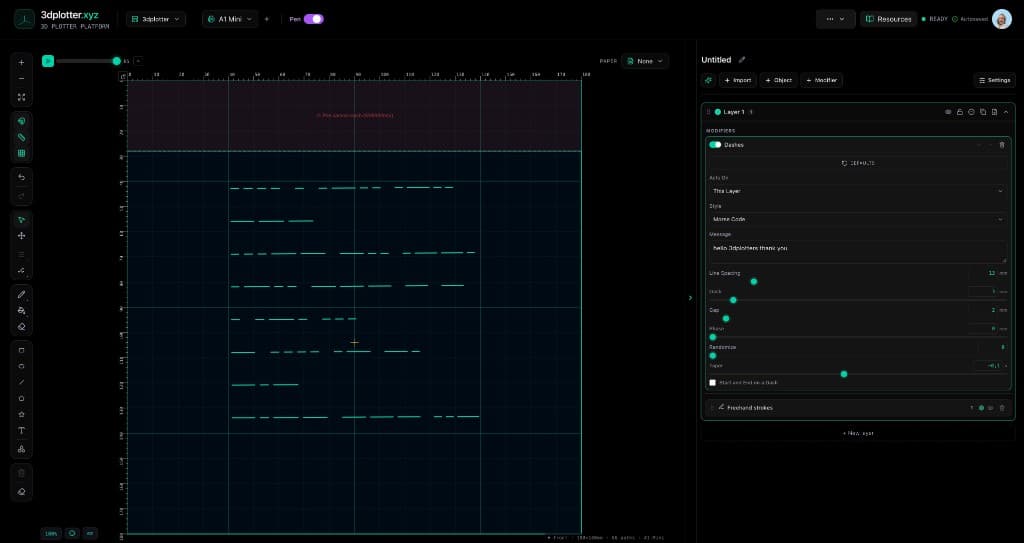
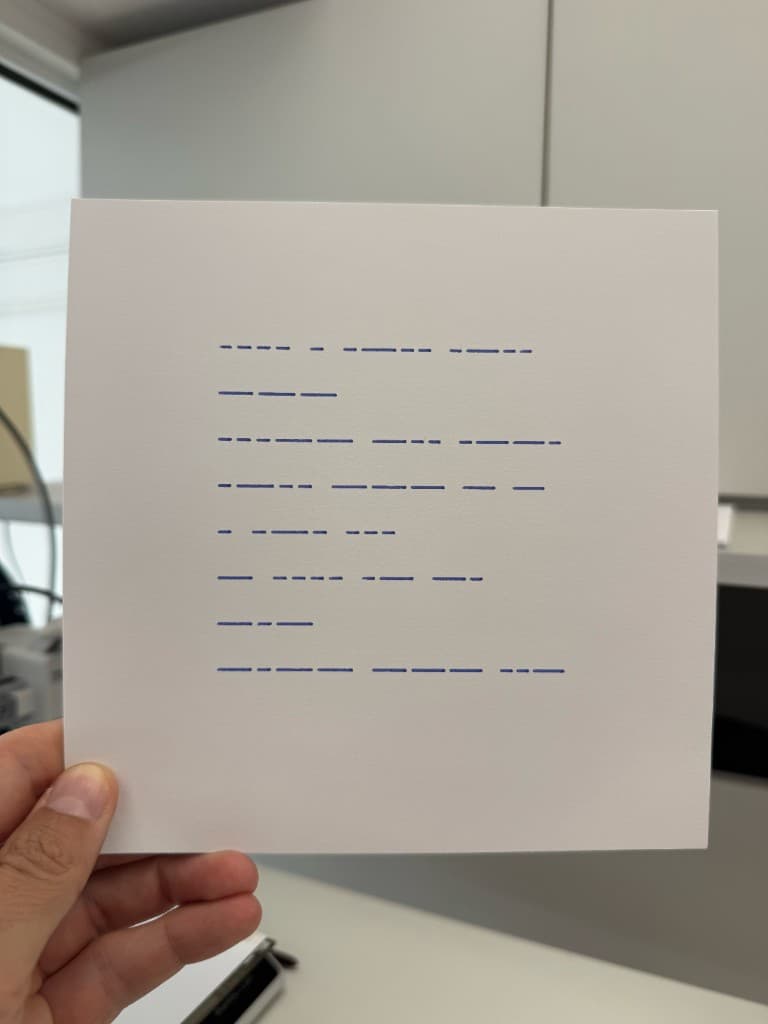
Break strokes into dashes, dots, or Morse code, all in your browser. This is Feature 6 of 69 in the 3DPlotter V3 series: a walkthrough of the Dashes modifier. I apply dashed patterns to shapes, switch to Morse Code on horizontal lines, type "hello 3dplotters thank you", and export G-code for your 3D printer. No Inkscape, no manual path breaking.
What you'll see in the video
- Add Modifier → Lines → Dashes on shapes and try Dashes, Dots, and Dash-Dot styles
- Tune Dash, Gap, Phase, Randomize, and Taper on rectangle and circle outlines
- Draw horizontal freehand lines as carrier strokes for Morse Code
- Switch Style to Morse Code and type "hello 3dplotters thank you" in the Message field
- Adjust Line Spacing, Dash (dot length), and Gap until the pattern reads clearly
- Export G-code and plot the finished Morse message on the Bambu Lab A1 Mini
How to use Dashes
- Select the layer whose linework you want to transform
- Open Studio → Add Modifier → Lines → Dashes
- A modifier node is appended to the layer stack (non-destructive)
- Reorder modifiers in the stack; later modifiers see earlier output
- Tune parameters in the modifier card in the right sidebar; preview updates on the canvas
Menu path: Add Modifier → Lines → Dashes
The story behind this plot
This piece is a thank-you to the 3DPlotter community. In the video I start with simple shapes and show how Dashes turns solid outlines into rhythmic patterns. Then I draw horizontal lines, switch Style to Morse Code, and type "hello 3dplotters thank you". The modifier wraps the message across the strokes: dash length becomes dot length, gap becomes Morse spacing, and export sends clean pen-up paths to the printer.
Dashes features
- Five styles: Dashes, Dots, Dash-Dot, Dash-Dot-Dot, and Morse Code
- Live preview: dash, gap, phase, and taper update the board instantly
- Morse Code message field: type plain text; lines wrap to fit stroke width
- Line Spacing: vertical gap between wrapped Morse lines
- Randomize and Seed: vary dash rhythm per stroke for hand-drawn texture
- Phase: shift the dash pattern along the stroke
- Taper: grow or shrink dash lengths along the path
- Start and End on a Dash: drafting-style trim so ends look clean
- Acts On: This Layer or This Layer and Below
- Non-destructive stack: remove or reorder the modifier to revert
- Direct G-code export: PlotFlow outputs pen-optimized paths for your printer
Why Dashes beats manual path breaking
Most workflows mean duplicating strokes, breaking paths at intervals, or scripting dash patterns in Inkscape. Dashes runs live as a modifier on shapes, freehand strokes, imports, and generator output, including full Morse encoding from a text field.
Key controls
- Acts On: own, options: This Layer, This Layer and Below
- Style: dash, options: Dashes, Dots, Dash-Dot...
- Line Spacing: 20mm (2-80mm step 0.5)
- Dash: 3mm (0.2-40mm step 0.1)
- Gap: 2mm (0.2-40mm step 0.1)
Tune acts on, style, line spacing, dash, and gap in the right sidebar. Open Studio to see every control.
Modifier stack: May add, drop, or reorder paths; selection maps reset for this layer
Acts On: Choose *This Layer* or *This Layer and Below* in the right sidebar.
What I plot with Dashes
- Dashed and dotted outlines on shapes, maps, and decorative borders
- Morse code messages encoded as pen strokes on horizontal or curved lines
- Sketchy, hand-drawn rhythm with Randomize and Taper on any linework
- Layered linework exported as G-code with pen-up travel
- Combined with other V3 objects and modifiers on Bambu Lab, Prusa, Creality, and other pen-holder setups
Frequently asked questions
How do I add dashes to a pen plot in 3DPlotter?
Select your linework layer, then Add Modifier → Lines → Dashes. Tune Style, Dash, and Gap in the right sidebar.
How do I plot Morse code with a pen plotter?
Draw horizontal lines (or use any stroke as the reference width), apply Dashes, set Style to Morse Code, and type your message in the Message field.
What is the difference between Dashes, Dots, and Morse Code?
Dashes repeats dash-gap segments along the stroke. Dots uses short dots with gaps. Morse Code encodes letters as dot and dash patterns from your message text.
Does the Morse code update when I change the text?
Yes. Edit the Message field and the board updates live. Line Spacing controls vertical distance between wrapped lines.
Can I apply Dashes to shapes?
Yes. Rectangles, circles, freehand strokes, imported SVG paths, and generator output all work. In the video I demo shapes first, then Morse on lines.
Is Dashes non-destructive?
Yes. Dashes is a modifier node on the layer stack. Tweak settings, reorder, or remove it without redrawing the original stroke.
Try Dashes
Open 3DPlotter Studio, follow the steps above, and export a test plot. Lifetime V3 access is €29.90. Creator Bundle (€39.90) adds Map to Pen Plot, String Art, Wax Seal, and 3D Model to SVG.
More tools: Feature hub · V3 launch