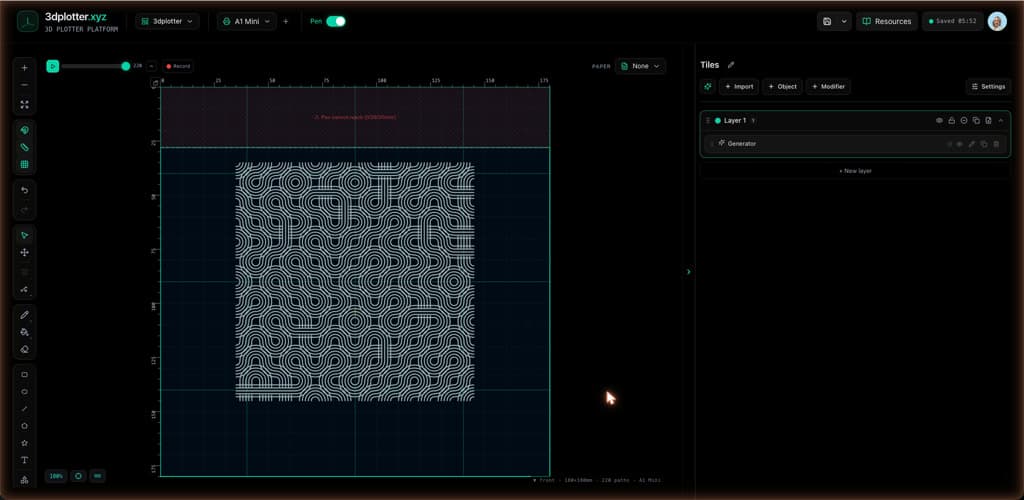
Build a Truchet field of arcs and crossings that join into long continuous runs with Tiles, all in your browser. This is Feature 60 of 69 in the 3DPlotter V3 series.
How to use Tiles
- Open Studio → Add Object → Experimental → Tiles
- A live Tiles element is added to the active layer
- Tune parameters in the element card in the right sidebar (live preview on the canvas)
- Export plot-ready G-code when satisfied
Menu path: Add Object → Experimental → Tiles
What it does
Tiles fills a grid with tiles that are either arcs or straight crossings, so lines connect into winding runs. You set the grid, the number of lines per tile, the arc mix, S-curves, a gap where one run passes under another, and a seed.
What I set up in the demo
- Add Object → Tiles and set Size to 110 mm
- Set Columns and Rows to 12
- Set Lines per Tile to 5
- Raise Arc Mix to 0.9 and add S-Curve 0.6
- Set Crossing Gap to 1 and Seed to 21
- Rename, export G-code, and save the board
Tips for clean plots
- The default size sits within 3 mm of the unreachable strip on an A1 Mini, so reduce it a little.
- More lines per tile multiplies the plot time quickly.
Key controls
- Size: 150mm (20-300mm step 1)
- Columns: 8tiles (1-40tiles step 1)
- Rows: 8tiles (1-40tiles step 1)
- Lines per Tile: 3 (1-12 step 1)
- Band Width: 0.6 (0.1-0.9 step 0.05)
Tune size, columns, rows, lines per tile, and band width in the right sidebar. Open Studio to see every control.
Shuffle (in the element card) re-rolls: seed, gridCols, gridRows, lineCount, pipeWidth, sCurviness, diagonalWeight, crossingGap, wobble, layerCount.
What I plot with Tiles
- Pen-plotter art on Bambu Lab, Prusa, Creality, and other pen-holder setups
- Layered linework exported as G-code with pen-up travel
- Combined with other V3 objects and modifiers in the same document
Frequently asked questions
What is a Truchet tiling?
A grid of simple tiles that join into continuous curves.
What does Seed do?
It picks a different random layout.
What is Crossing Gap?
A small break where one run passes under another.
Try Tiles
Open 3DPlotter Studio, follow the steps above, and export a test plot. Lifetime V3 access is €29.90. Creator Bundle (€39.90) adds Map to Pen Plot, String Art, Wax Seal, and 3D Model to SVG.
More tools: Feature hub · V3 launch