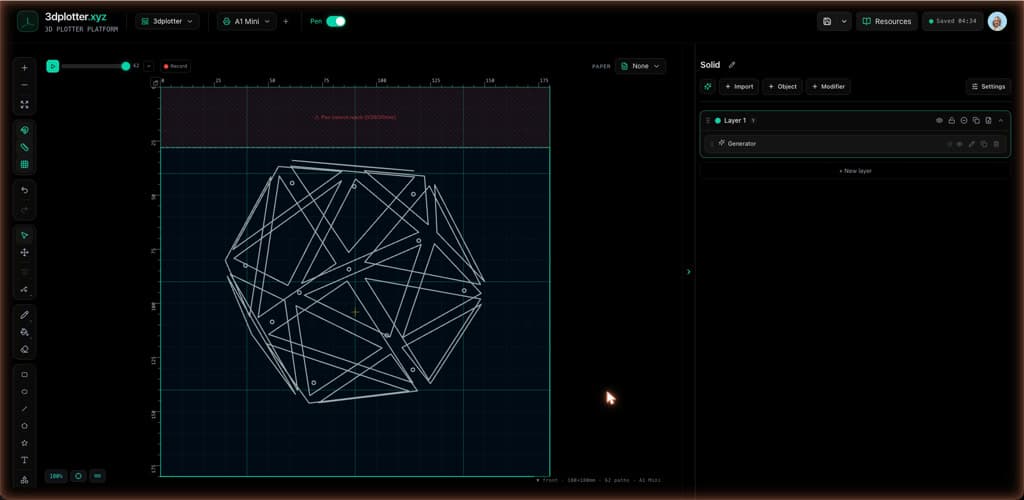
Draw a platonic solid you can turn, swell and pull apart with Solid, all in your browser. This is Feature 51 of 69 in the 3DPlotter V3 series.
How to use Solid
- Open Studio → Add Object → 3D → Solid
- A live Solid element is added to the active layer
- Tune parameters in the element card in the right sidebar (live preview on the canvas)
- Export plot-ready G-code when satisfied
Menu path: Add Object → 3D → Solid
What it does
Solid draws a tetrahedron, cube, octahedron or icosahedron. You can explode its faces apart, extrude them, twist the whole thing and mark the corners with points.
What I set up in the demo
- Hide Layer 1, add Object → Solid, and set Radius to 42 mm
- Show the layer and switch between Tetrahedron, Cube, Octahedron and Icosahedron
- Set Explode to 6 mm and Extrude Faces to 4 mm
- Twist it by 30°
- Turn on Corner Points
- Rename, export G-code, and save the board
Tips for clean plots
- The default radius of 72 mm reaches into the top 28 mm on an A1 Mini. Reduce it first.
- Explode and Extrude add lines, so plot time grows quickly.
Key controls
- Solid: icosahedron, options: Tetrahedron, Cube, Octahedron, Icosahedron
- Radius: 76mm (24-300mm step 1)
- Bulge / Invert: 10mm (-200-200mm step 0.5)
- Extrude Faces: 0mm (0-200mm step 0.5)
- Explode: 0mm (0-200mm step 0.5)
Tune solid, radius, bulge / invert, extrude faces, and explode in the right sidebar. Open Studio to see every control.
Shuffle (in the element card) re-rolls: solid, showFaces, showEdges, showVertices, bulge, twist.
What I plot with Solid
- Pen-plotter art on Bambu Lab, Prusa, Creality, and other pen-holder setups
- Layered linework exported as G-code with pen-up travel
- Combined with other V3 objects and modifiers in the same document
Frequently asked questions
Which solids can I draw?
Tetrahedron, cube, octahedron and icosahedron.
What does Explode do?
It pulls the faces apart from the centre.
Can I plot corner points?
Yes. Turn on Corner Points to mark each vertex.
Try Solid
Open 3DPlotter Studio, follow the steps above, and export a test plot. Lifetime V3 access is €29.90. Creator Bundle (€39.90) adds Map to Pen Plot, String Art, Wax Seal, and 3D Model to SVG.
More tools: Feature hub · V3 launch