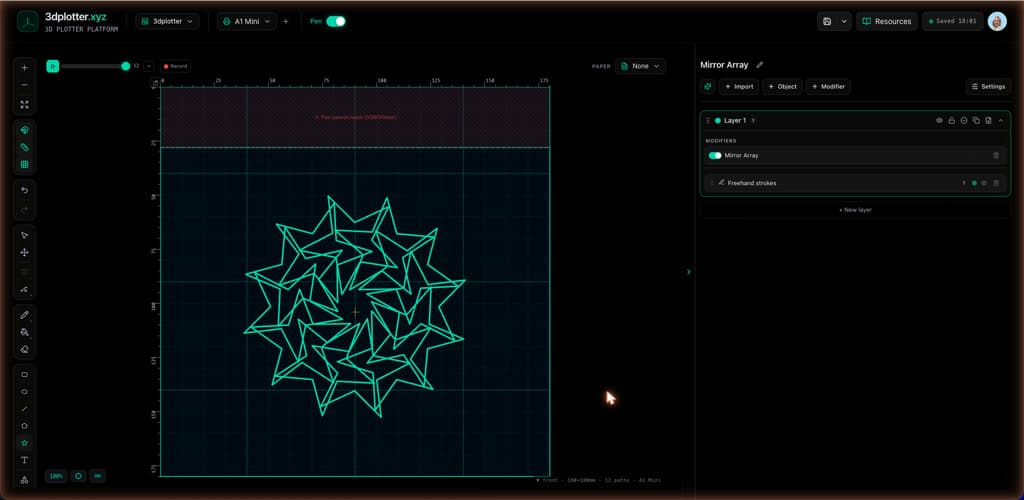
Mirror any drawing around a centre with Mirror Array, all in your browser. Make kaleidoscopes, snowflakes, and pinwheels from one small shape. This is Feature 20 of 69 in the 3DPlotter V3 series.
How to use Mirror Array
- Select the layer whose linework you want to transform
- Open Studio → Add Modifier → Pattern → Mirror Array
- A modifier node is appended to the layer stack (non-destructive)
- Reorder modifiers in the stack; later modifiers see earlier output
- Tune parameters in the modifier card in the right sidebar; preview updates on the canvas
Menu path: Add Modifier → Pattern → Mirror Array
What it does
Mirror Array repeats the input in radial segments. Mirror flips every other segment, Rotate Only repeats it without flipping, and Pinwheel turns each blade. With Sample One Wedge on, only one wedge of the drawing is used; turn it off to repeat the whole artwork.
What I set up in the demo
- Draw a star near the centre of the board and add Mirror Array
- Switch Mode between Mirror, Rotate Only, and Pinwheel
- Change Segments from 6 up to 12 and Rotate the pattern
- Add Push Out to move the copies away from the centre and a Hollow Centre
- Turn Sample One Wedge off to see the full rosette
Tips for clean plots
- Mirror Array turns around the centre of the board, so draw the starting shape near the centre.
- Blade Twist only shows in Pinwheel mode.
Key controls
- Acts On: own, options: This Layer, This Layer and Below
- Mode: mirror, options: Mirror, Rotate Only, Pinwheel
- Segments: 6 (2-32 step 1)
- Rotate: 0° (0-360° step 1)
- Push Out: 0mm (-100-200mm step 1)
Tune acts on, mode, segments, rotate, and push out in the right sidebar. Open Studio to see every control.
Modifier stack: May add, drop, or reorder paths; selection maps reset for this layer
Acts On: Choose *This Layer* or *This Layer and Below* in the right sidebar.
What I plot with Mirror Array
- Pen-plotter art on Bambu Lab, Prusa, Creality, and other pen-holder setups
- Layered linework exported as G-code with pen-up travel
- Combined with other V3 objects and modifiers in the same document
Frequently asked questions
How do I make a kaleidoscope pattern?
Draw a shape and add Mirror Array in Mirror mode. Raise Segments to get more reflections.
What is the difference between Mirror and Rotate Only?
Mirror flips every other segment so neighbouring copies are reflections. Rotate Only repeats the same wedge without flipping.
How do I get a hole in the middle?
Raise Hollow Centre to cut out the middle.
Try Mirror Array
Open 3DPlotter Studio, follow the steps above, and export a test plot. Lifetime V3 access is €29.90. Creator Bundle (€39.90) adds Map to Pen Plot, String Art, Wax Seal, and 3D Model to SVG.
More tools: Feature hub · V3 launch