Day 8 of our V3 countdown is here, and this one is for everyone who wants total control over every line your printer draws.
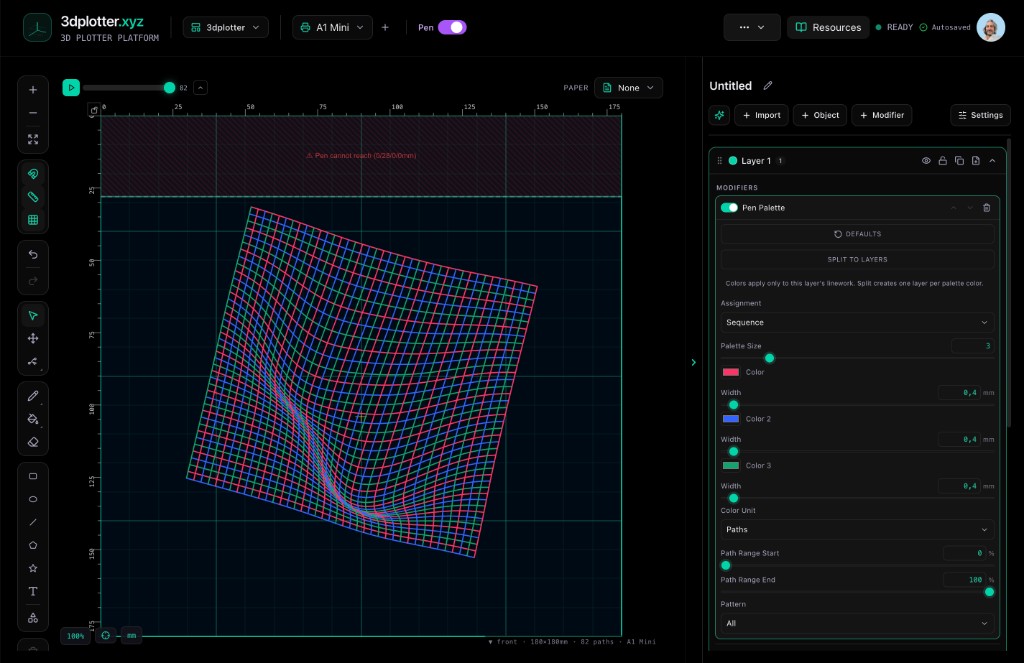
Today we're rolling out Modifiers Lines: a non-destructive stack of tools that lets you tweak your plot without ever touching the original design. Think of it like layers in Photoshop, but for G-code.
Here's what you get in V3:
🎨 Pen Palette – assign different pens and colors to different parts of your drawing. No more manual color swaps mid-plot.
↔️ Offset – nudge lines left, right, up, or down. Perfect for fine-tuning alignment or creating cool layered effects.
➖ Dashes – convert solid lines into dashed or dotted patterns. Great for technical drawings or adding a sketchy feel.
✏️ Line Edit – tweak individual lines: change thickness, skip them, or reorder the drawing sequence.
🔍 Filter – hide or show lines based on color, length, or direction. Ideal for cleaning up messy SVGs or isolating specific elements.
🖼️ Overlay – place multiple drawings on top of each other, adjust transparency, and create composite plots.
And the best part? Everything is non-destructive. You can stack modifiers, reorder them, and tweak settings as much as you want. Your original file stays untouched.
This is a game-changer for makers who want to push their 3D printer's plotting capabilities without buying new hardware. Whether you're crafting cards, posters, or technical diagrams, these tools give you the precision of a dedicated plotter at a fraction of the cost.
We built V3 with the same philosophy that drives everything at 3dplotter: do more with what you already own. No extra machines, no expensive upgrades. Just smart software that turns your Bambu Lab (or any FDM printer) into a creative powerhouse.
👉 Try 3dplotter today and start plotting like a pro.
