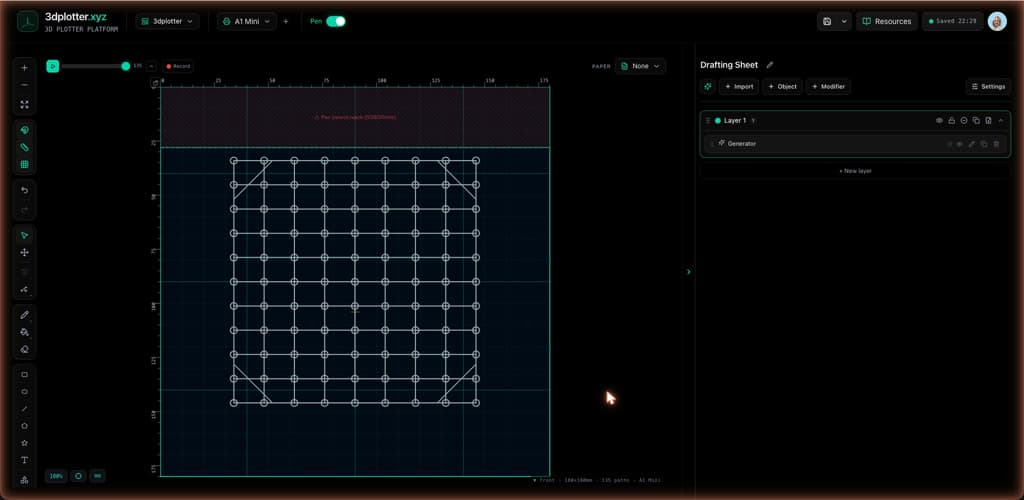
Draw measured grids and registration marks with Drafting Sheet, all in your browser. It makes a cutting-mat style grid you can size by cell count. This is Feature 44 of 69 in the 3DPlotter V3 series.
How to use Drafting Sheet
- Open Studio → Add Object → Lines & Patterns → Drafting Sheet
- A live Drafting Sheet element is added to the active layer
- Tune parameters in the element card in the right sidebar (live preview on the canvas)
- Export plot-ready G-code when satisfied
Menu path: Add Object → Lines & Patterns → Drafting Sheet
What it does
Drafting Sheet draws a grid with heavier lines every few cells, corner guides, a border, and markers at the crossings. You can draw the grid, the markers, or both, and choose the marker style.
What I set up in the demo
- Add Drafting Sheet from Add Object → Lines & Patterns
- Set Margin to 34 mm to stay inside the reachable area
- Set Columns to 8 and Rows to 10
- Set Major Every to 2 for heavier lines every second cell
- Change Marker to Circle, then try Markers Only, Grid Only, and Grid + Markers
Tips for clean plots
- The default 14 mm margin puts the top row in the unreachable strip of the A1 Mini. Use 34 mm.
- Corner guides and the border can be turned off with the checkboxes at the bottom.
Key controls
- Sheet: cuttingMat, options: Cutting Mat, Dial, Calendar
- Draw: gridMarkers, options: Grid + Markers, Grid Only, Markers Only
- Sized By: count, options: Cell Count, Cell Size
- Marker: plus, options: Plus, Cross, Circle...
- Arc: semicircle, options: Semicircle, Custom Arc, Full Circle
Tune sheet, draw, sized by, marker, and arc in the right sidebar. Open Studio to see every control.
Shuffle (in the element card) re-rolls: preset, gridMode, gridSizing, gridColumns, gridRows, gridMajorInterval, gridMarker, gridBorder, gridCornerGuides, dialGeometry, dialMajorStep, dialSubdivisions, dialTickDirection, dialRim, dialHub, calendarView, calendarMonth, calendarWeekStart, calendarYearLayout.
What I plot with Drafting Sheet
- Pen-plotter art on Bambu Lab, Prusa, Creality, and other pen-holder setups
- Layered linework exported as G-code with pen-up travel
- Combined with other V3 objects and modifiers in the same document
Frequently asked questions
How do I plot a cutting mat or measured grid?
Add Drafting Sheet. It starts as a cutting mat grid. Set columns, rows, and how often a heavier line appears.
What marker styles are there?
Plus, Cross, Circle, Square, and Diamond.
Can I draw only the markers?
Yes. Set Draw to Markers Only.
Try Drafting Sheet
Open 3DPlotter Studio, follow the steps above, and export a test plot. Lifetime V3 access is €29.90. Creator Bundle (€39.90) adds Map to Pen Plot, String Art, Wax Seal, and 3D Model to SVG.
More tools: Feature hub · V3 launch