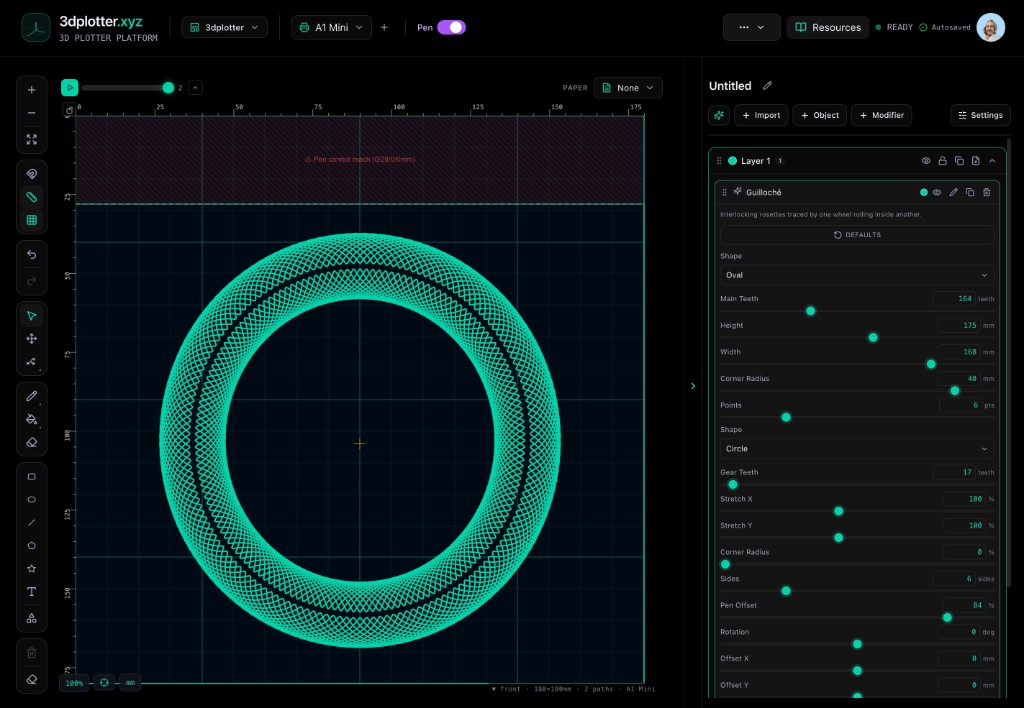
Day 5 of our V3 launch series is all about the generator suite. We've packed 3dplotter v3 with seven algorithmic pattern generators that turn your 3D printer into a precision drawing machine.
From guilloché (the fine-line patterns on banknotes) to moiré, stipple, recursion, ruling, current, and loom effects, each generator is one click away. No manual G-code, no Inkscape plugin roulette. Just pick a pattern, tweak the parameters, and let the PlotFlow Engine handle the rest.
Here's what each generator brings to your pen plotter setup:
- Guilloché: intricate, overlapping curves for a security-print look on cards and posters.
- Moiré: interference patterns that create optical illusions with simple line sets.
- Stipple: dot-based shading for portraits and textures without halftone headaches.
- Recursion: fractal-like branching that grows organically across the bed.
- Ruling: classic parallel-line fills for technical drawings and architectural sketches.
- Current: flowing, wave-like paths that mimic water or wind.
- Loom: woven, crosshatch textures perfect for fabric-inspired art.
Why does this matter for you? Because a v3 3dplotter system turns an idle printer into a creative studio. You already own the hardware; the generator suite makes it a multi-tool for art, greeting cards, technical diagrams, and more.
Want to see the generators in action? Check the gallery for community designs, or jump into the get-started guide to run your first pattern tonight. Drop a comment with the pattern you're most excited to try, and tag a maker friend who needs this in their workflow.
3dplotter v3 is live now. Turn your 3D printer into a pen plotter and start generating lines that impress.
